CGuard — C盘扩容助手
A downloadable tool for Windows
CGuard — C盘扩容助手
Inspect your disks, preview the target C: capacity, and rehearse the expansion workflow in a local browser. CGuard 1.0.0 is an initial paid release for Windows 10/11 x64 with a Chinese interface and a bundled runtime. Real disk changes require a supported layout and validation; this workflow does not back up C: or provide C: or whole-system rollback.
先看清方案,再调整 C 盘容量
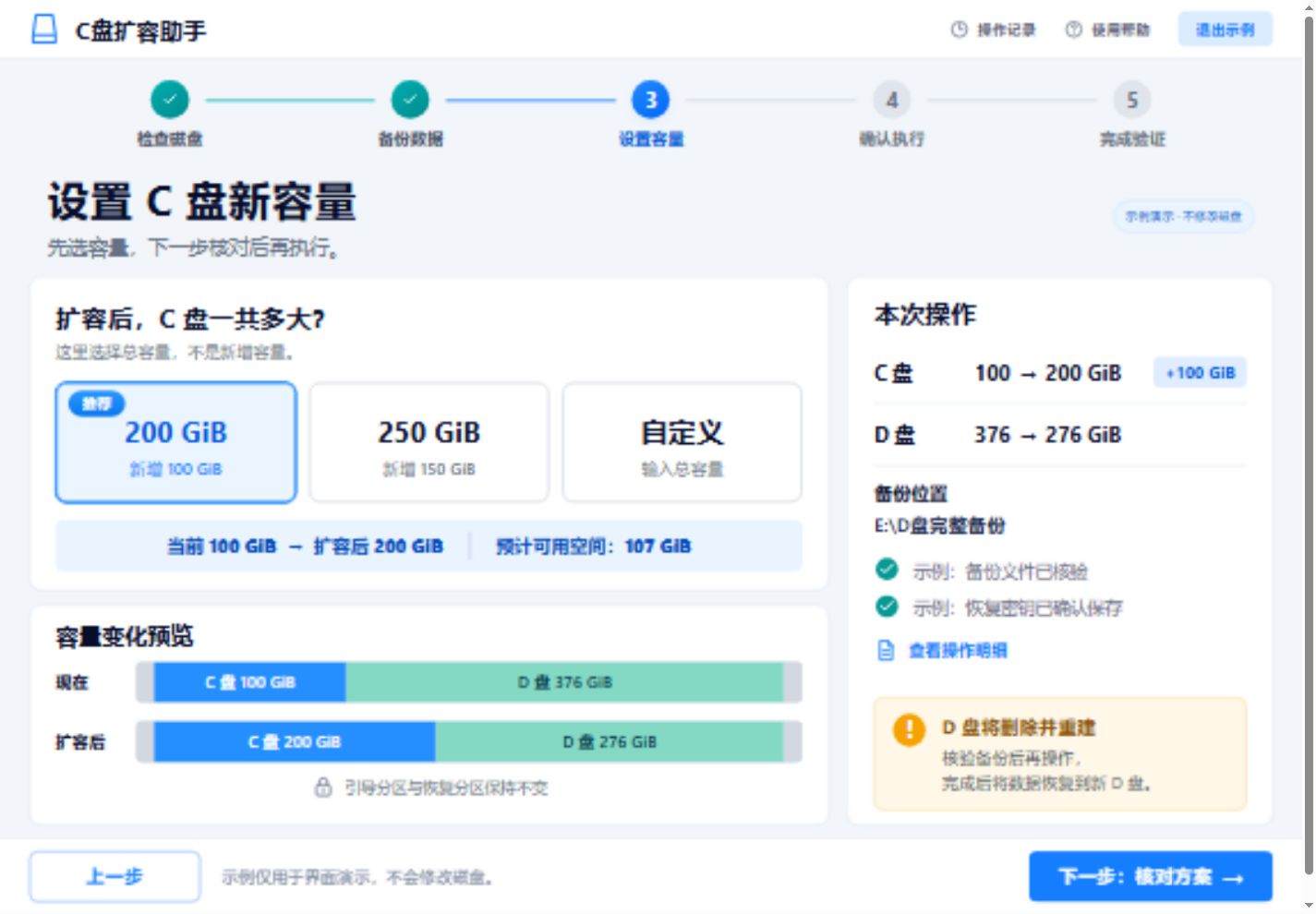
CGuard 将磁盘检查、容量预览、风险确认、实施与验收整理成五阶段界面。选择的是扩容后 C 盘的总容量,容量以 GiB 显示。界面在本机浏览器中运行,无需另装 Python 或 Node.js,也无需联网打开本地界面。
当前为 1.0.0 试售版本。模拟演练可用;真实执行有布局和验证门禁。购买软件不代表本机一定符合扩容条件。本流程不备份 C,不提供 C 盘或整机回退。分区变更可能影响数据或启动,请先核对下方支持范围。
- 查看真实磁盘信息,预览容量变化和操作摘要。
- 先演练实施、异常恢复和验收,再判断真实方案是否适用。
- 查看任务记录、备份位置与报告;同一 Windows 用户重新打开可接回任务。
真实执行支持范围
- 同盘连续空间:C 右侧已有足够连续未分配空间时可规划扩容。容量必须来自 C 所在的同一物理磁盘,不能借用另一块磁盘的容量。
- 相邻普通 NTFS 数据卷:支持范围包括 GPT 基本磁盘的相应布局。数据卷必须健康、未加密、可独占锁定,并能收缩到目标大小;另一块磁盘的 NTFS 备份卷须容纳原始和缩小后的两份完整卷镜像。真实删除、重建与恢复前,必须通过客户机上的新鲜验证。数据恢复保留 C 当前容量;备份不包含卷外应用配置或其他卷数据。
- WinRE 恢复分区迁移:仅限未加密的特定 MBR C/F 跨盘布局。C、F 分别位于不同的 MBR 磁盘,均为健康 NTFS 卷;F 须位于目标磁盘末尾,并有足够可收缩空间。迁移需要重启与启动验收,完成后恢复功能依赖 F 所在设备。
当前真实执行要求 C 未加密。同盘任意移动恢复分区、“恢复分区 + 数据分区”组合迁移、动态卷、Storage Spaces、文件夹挂载点和任意业务应用自动停服尚不支持。软件不能放在将被删除的数据卷上。无法锁定、布局未知或校验失败时,流程会停止。第三方应用可能依赖旧分区标识,需要另行验收;不承诺任意布局适配、无损操作或断电、硬盘损坏后的自动恢复。
运行与下载
需要 Windows 10/11 x64、Windows PowerShell 5.1 和现代浏览器。当前软件界面为中文。真实执行还依赖相应 Windows 存储组件、符合条件的磁盘和备份空间,并在修改磁盘时请求管理员权限。仅安装或打开界面不会自动修改分区。
- 安装版:
CGuard-Setup-1.0.0-x64.exe,建议多数用户选择。 - 便携版:
CGuard-Portable-1.0.0-x64.zip,完整解压后运行CGuard.exe,保留同目录的_internal文件夹。 - 校验文件:
SHA256SUMS.txt。
安装包尚未代码签名,Windows 可能显示“未知发布者”。请核对下载来源和 SHA-256 校验值。更新或卸载前请退出软件;卸载保留任务资料和实际备份。
已完成安装、完整模拟流程和卸载保留任务资料验证;安装验收没有执行真实磁盘修改。数据卷核心另有专用 VHDX 环境中的验证记录。这些结果不代表任意客户业务环境、突然断电或硬盘损坏已获认证。
English support summary
- Requirements: Windows 10/11 x64, Windows PowerShell 5.1, and a modern browser. The UI is Chinese. Disk changes need suitable Windows storage components and administrator approval. C: must be unencrypted.
- Capacity: Enough contiguous unallocated space directly to the right of C:, on the same physical disk. Capacity cannot be borrowed from another disk.
- Adjacent NTFS data volume: Supported basic-disk layouts include GPT. The volume must be healthy, unencrypted, exclusively lockable, and shrinkable. Another NTFS disk must hold two full-volume images. Fresh validation on the customer's machine is required before real deletion, rebuilding, and restoration. Restoration keeps the current C: capacity and excludes data outside the backed-up volume.
- WinRE migration: Only the supported unencrypted MBR C:/F: layout on separate disks. Both volumes must be healthy NTFS; F: must be at the end of its MBR disk with sufficient shrinkable space. Restart and boot verification are required. Recovery then depends on F:'s device.
- Limits: No C: backup or C:/whole-system rollback. No arbitrary recovery-partition movement, combined recovery/data migration, dynamic volumes, Storage Spaces, folder mount points, or automatic shutdown of arbitrary business applications. Third-party applications need separate acceptance checks. No guarantee of lossless operation or recovery from power loss or disk failure.
The package is unsigned; Windows may show an unknown-publisher message. Check the supplied SHA-256 checksums. Installation and simulation checks have passed, and data-core tests have been recorded on dedicated VHDX volumes. These checks do not certify every disk layout or customer business environment.
Download
This tool is currently unavailable
Leave a comment
Log in with itch.io to leave a comment.